Instant detection
Reacts to VPN changes in under a second by watching the network interfaces directly — no polling delay.
 VPN Status
Menu bar VPN monitor for macOS
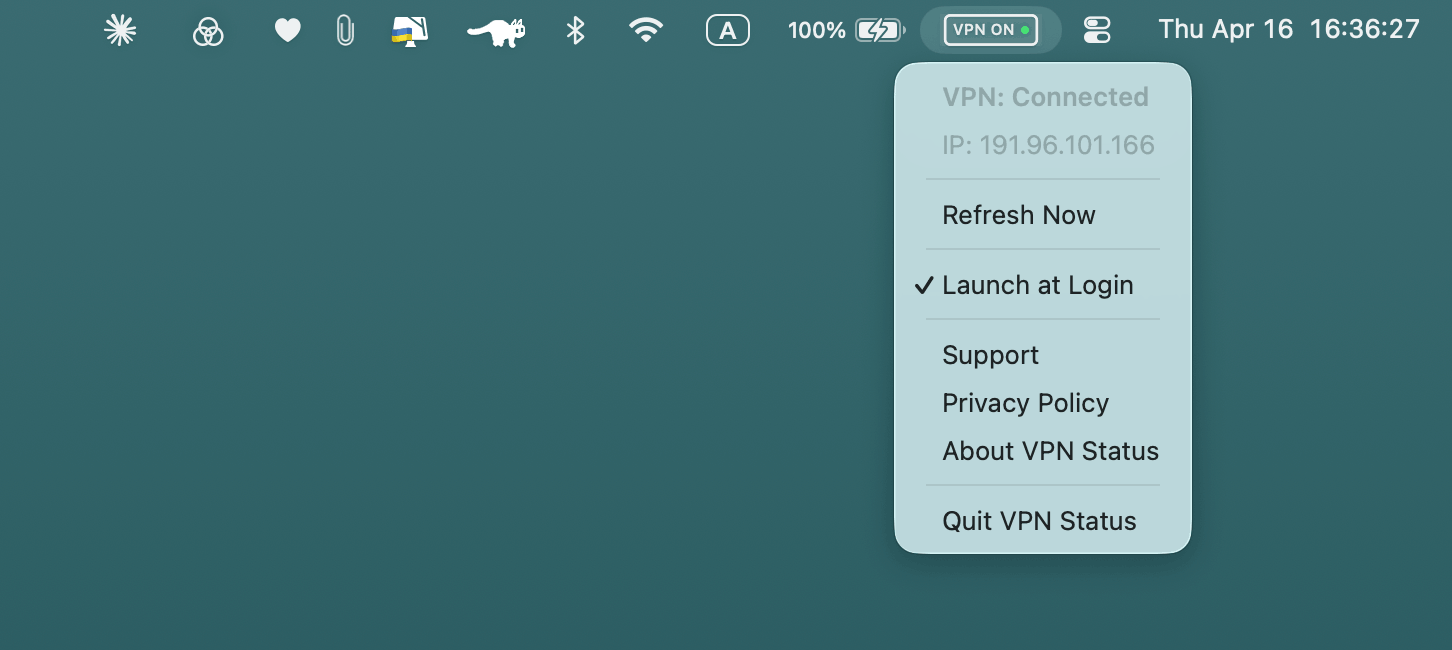
A tiny macOS app that lives in your menu bar. A green dot that pulses when the tunnel is up, a red one when it is not, and your public IP either way.
Designed for one small job
Reacts to VPN changes in under a second by watching the network interfaces directly — no polling delay.
VPN ON with a green dot that pulses gently while the tunnel is up. VPN OFF in red, static and paler, when it is not.
Switch to the dot alone and the badge drops from 51 to 22 points — useful on a notched laptop with a crowded menu bar.
Shown connected and disconnected on purpose: comparing your real address against the tunnel’s exit is the whole point. Click it to copy.
Approximate location and, when connected, the network you exit through, the tunnel interface, and how long it has been up.
A notification when the VPN drops and when it returns. Turn them off from the menu and the permission prompt never appears.
No accounts, no analytics, no tracking, and no server of ours to talk to. The only request is the IP lookup below.
Pure AppKit, no dependencies. Negligible CPU and memory footprint.
Set it once and forget it. VPN Status starts silently with macOS and stays out of the way.
Download
Works on macOS 13 Ventura or later. The interface follows your system language and can be pinned to either English or Simplified Chinese from the menu.
Legal
Last updated: August 2026
VPN Status does not collect, store, or share any personal data. It runs entirely on your device.
VPN Status inspects your Mac's network interfaces to detect whether a VPN tunnel is active. That inspection is entirely local and never leaves the device. To show your public IP and approximate location, the app makes an occasional request to a third-party lookup service.
None. VPN Status does not collect, transmit, or store any personal information, usage data, analytics, crash reports, or identifiers of any kind.
The only outbound request made by VPN Status is:
GET https://ipinfo.io/json
It is sent to ipinfo.io, a third-party lookup service, and returns your public IP with an approximate city, country, and network operator. That is displayed in the menu and held in memory only. VPN Status does not control ipinfo.io's data practices — refer to their privacy policy for details.
The app makes that request:
A failed request backs off, doubling the wait up to an hour. In ordinary use this comes to roughly 100 requests a day. The request is made in both states because the app shows your IP in both — comparing your real address against the tunnel's exit is the point of the app. It is never used for tracking, and never sent to any server operated by VPN Status or its developer.
VPN Status stores three preferences locally using macOS
UserDefaults: whether to notify you when the VPN state
changes, whether the menu bar shows the compact dot, and which
interface language to use. Nothing
else is written to disk — the IP lookup uses an ephemeral session,
so responses are never cached. No IP addresses, network data, or
personally identifiable information is ever stored.
With Notify on Changes enabled, macOS asks for notification permission the first time your VPN state actually changes. Notifications are generated and delivered entirely on your device. Turning the setting off, or declining the prompt, stops them; nothing is sent anywhere either way.
VPN Status contains no third-party SDKs, advertising frameworks, analytics libraries, or crash reporting tools.
Questions about privacy can be sent to go@100k31d.co.
Legal
Last updated: August 2026
VPN Status is a status indicator, not a security tool. Always verify your VPN connection through your VPN provider's own app or dashboard for security-critical use cases.
By downloading or using VPN Status ("the App"), you agree to these terms. If you do not agree, do not use the App.
VPN Status is provided for personal and commercial use. You may not reverse-engineer, modify, resell, or redistribute the App without explicit written permission from the developer.
The App is provided "as is", without warranty of any kind, express or implied. VPN Status indicates whether a VPN interface is active on your device — it does not guarantee that your VPN provider is functioning correctly, that your traffic is encrypted, or that your connection is private.
The developer shall not be liable for any direct, indirect, incidental, or consequential damages arising from the use or inability to use the App, including but not limited to data loss, security incidents, or reliance on the App's connection status indicator.
The App uses ipinfo.io to display your public IP address and approximate location, whether or not a VPN is connected. Use of that service is subject to ipinfo.io's own terms and privacy policy, which are independent of VPN Status.
These terms may be updated from time to time. Continued use of the App after changes are posted constitutes acceptance of the revised terms.
For questions about these terms, contact us at go@100k31d.co.
VPN Status for macOS
Requires macOS 13 Ventura or later. Apple Silicon and Intel.
Mac App Store ↗